

Connections
Your whole stack, live in one place.
Google Ads, Google Analytics, Search Console, Business Profile, Google Calendar, Meta and your website's forms all feed Merlin. Connect each one in a few minutes and the numbers, reviews, enquiries and bookings keep arriving from then on — no exports, no copy and paste, no month-end spreadsheet.
Every connection is made by you, from inside Merlin, and can be withdrawn the same way. Nothing is ever connected on your behalf.
Plugs into the platforms you already run
- Google Ads
- Google Analytics 4
- Google Search Console
- Google Business Profile
- Meta Ads
- Google Calendar
- WordPress
- Wix
- Squarespace
What you get
Every connection switches something on.
Plug a platform in once and it shows up where you work — in your dashboards, your reviews inbox, your CRM and your booking calendar.
-
Google Ads
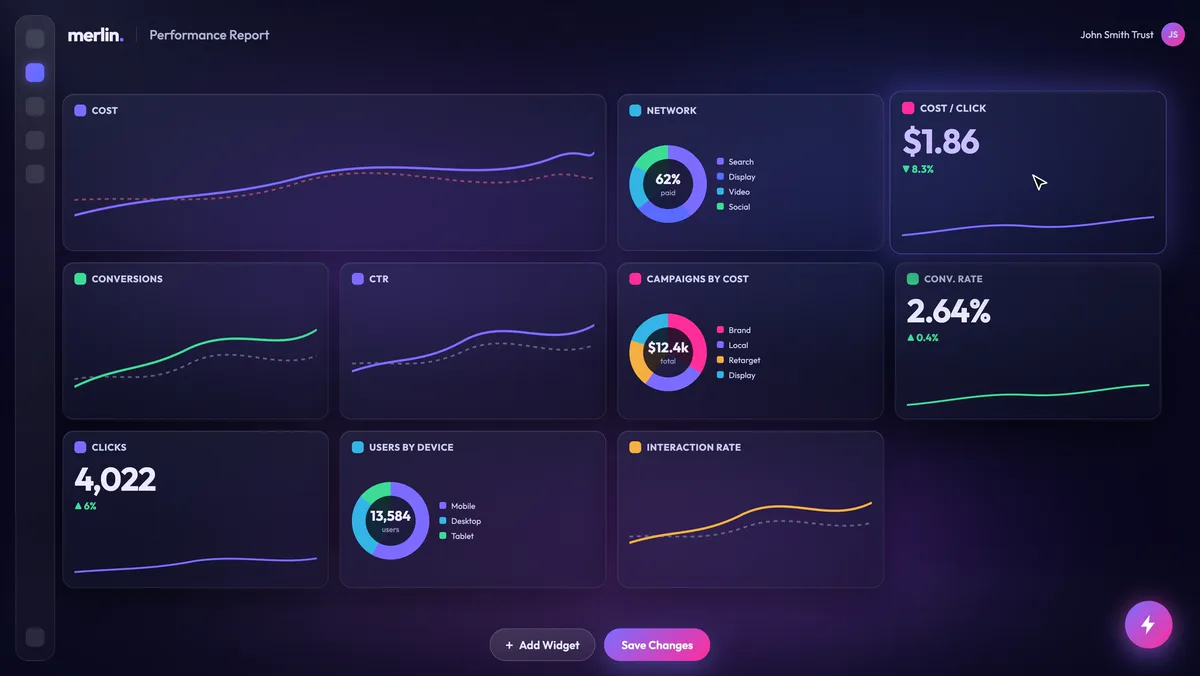
Paid search, accounted for. Spend, clicks, conversions and cost per click in dashboards you arrange yourself, through the manager-account link our team runs your campaigns from.
-
Google Analytics
Know what the traffic did. Sessions, users, goals and revenue, broken down by channel and device, next to the spend that bought them.
-
Google Search Console
Organic, in the same frame. Impressions, clicks and position for the properties you choose, so search sits beside paid instead of in another tool.
-
Meta Ads
Social spend, next to search. Advertising performance for the ad accounts you authorise, alongside your Google numbers in the same dashboard.
-
Google Business Profile
Every review, every location. New Google reviews arrive in Merlin for each location you sync, ready to read and answer without opening Google.
-
Google Calendar
A booking page that knows your diary. Times you are busy stop being offered to customers, and every booking lands in your calendar with the customer's details.
-
WordPress, Wix and Squarespace
Enquiries straight into the CRM. Site connectors file every form enquiry into lead capture the moment it is sent.
-
Merlin AI
Ask about your numbers. The assistant reads the same reporting data as your dashboards, so ‘how did paid search do last month?’ gets an answer and a chart. Your reviews and calendar stay out of it.
Platform names and marks are the property of their respective owners and are shown here to identify what Merlin connects to. Their use does not imply any partnership with, sponsorship by, or endorsement from those companies.
How connecting works
Four steps in, one step out.
-
You pick the platform
From Settings → Connections inside Merlin — or Booking settings, for your own calendar — you choose what to connect. Nothing happens until you do.
-
You say yes at Google or Meta
We send you to the platform's own sign-in and consent screen, which lists the permissions being requested. Merlin never sees your password. If you decline, nothing is shared.
-
You choose what we see
Pick the properties, ad accounts, business locations or calendar Merlin should use. We access only those — never everything the signed-in account can reach.
-
It goes live, and stays yours
The access token is encrypted at rest with AES-256-GCM under server-held keys and used only for the features you have switched on. Disconnect at any time and we revoke it at the source.
Permissions, in plain language
Exactly what we ask for, and why.
The narrowest access each feature needs, and nothing more. Scopes are shown by their
technical identifiers, without Google's https://www.googleapis.com/auth/
prefix; when you connect, Google's consent screen describes each in plain words. Every
Google connection also asks for
openid and email, so Merlin can show which Google account is
connected.
-
Google Analytics
List your GA4 properties so you can choose one, then — where you ask us to — create an access binding that gives our reporting account viewer access to it. Your dashboards then read through that access, a grant you make deliberately and can remove in Analytics at any time.
analytics.readonlyanalytics.manage.users -
Google Ads
List the Ads accounts your login can reach so you can choose one, then complete the manager-account link you initiate, so our media team can run the account and report on it in your dashboards.
adwords -
Google Search Console
List your Search Console properties so you can choose one and, where you are a verified owner, add our reporting email as a delegated owner of it, so we can report on impressions, clicks and position. It only ever adds an owner; it never removes one.
webmasters.readonlysiteverification -
Google Business Profile
List the business accounts and locations you manage, read the reviews left on the locations you choose, and post the replies you write in Merlin back to the profile.
business.manage -
Google Calendar
Connected by each team member for their own calendar. List your calendars so you can choose one, read only the times you are busy — never what your events say — so those times are not offered for booking, and add each booking to that calendar with the service and the customer's contact details. We only change events Merlin created.
calendar.freebusycalendar.calendarlist.readonlycalendar.events -
Meta
Read advertising performance for the ad accounts you authorise, so Meta results sit alongside your Google results in the same dashboard.
Google API Services User Data Policy. Merlin's use and transfer to any other app of information received from Google APIs will adhere to the Google API Services User Data Policy, including the Limited Use requirements. We use Google user data only to provide the user-facing features you have requested. We do not sell it, do not use it for advertising, do not allow humans to read it except in the narrow circumstances set out in our Privacy Policy, and never use it to develop, improve or train generalised AI or machine-learning models.
Withdrawing access
You can disconnect a platform from Settings → Connections in Merlin — we revoke the token at the provider and delete our stored copy. You can also revoke Merlin's access directly at myaccount.google.com/permissions or in your Meta Business settings. Note that a durable grant you asked us to make on the platform itself — a Google Ads manager link, a GA4 access binding or a Search Console owner — lives on that platform, and is removed there or through our off-boarding process. Full instructions, including account deletion.
Security & privacy
Built to be trusted with the keys.
Merlin holds two kinds of sensitive material: the credentials that let us read your platforms, and the customer records your business stores with us. Both are treated accordingly.
- Tokens encrypted at rest OAuth tokens and connection credentials are encrypted with AES-256-GCM under keys held server-side.
- Signed lead capture Every lead-capture request is HMAC-SHA256 signed, with replay protection, per-account rate limits and domain and IP allow-lists.
- Minimum scopes We request only the permissions the features you enable require, and touch only the accounts and assets you select.
- Revocable at any time Disconnect inside Merlin, at your Google account permissions page, or in Meta Business settings.
- Australian privacy law Personal information is handled in line with the Privacy Act 1988 (Cth) and the Australian Privacy Principles, and the New Zealand Privacy Act 2020.
- Never used to train AI Google user data is never sold, never used for advertising, and never used to train generalised AI models.
See it all in one place.
Book a demo and we will walk you through real dashboards fed by these connections — live, scoped to what the work needs, and yours to withdraw at any time.
Merlin is a product of Disrupt Digital Pty Ltd (ABN 84 632 577 818).